13 min read
This is a start-to-finish, step-by-step guide to decompiling old games with AI coding agents, based on three projects that went the distance:
- Chris Lewis matched all 2,145 functions of the Nintendo 64 game Snowboard Kids in 84 days.[1]
- Macabeus took the 2001 GBA game Klonoa: Empire of Dreams to 51% with Claude Code and built three tools of his own along the way.[3]
- Piotr Migdał of Quesma rebuilt the Windows XP-era puzzle game Chromatron four different ways with Ghidra and AI.[2]
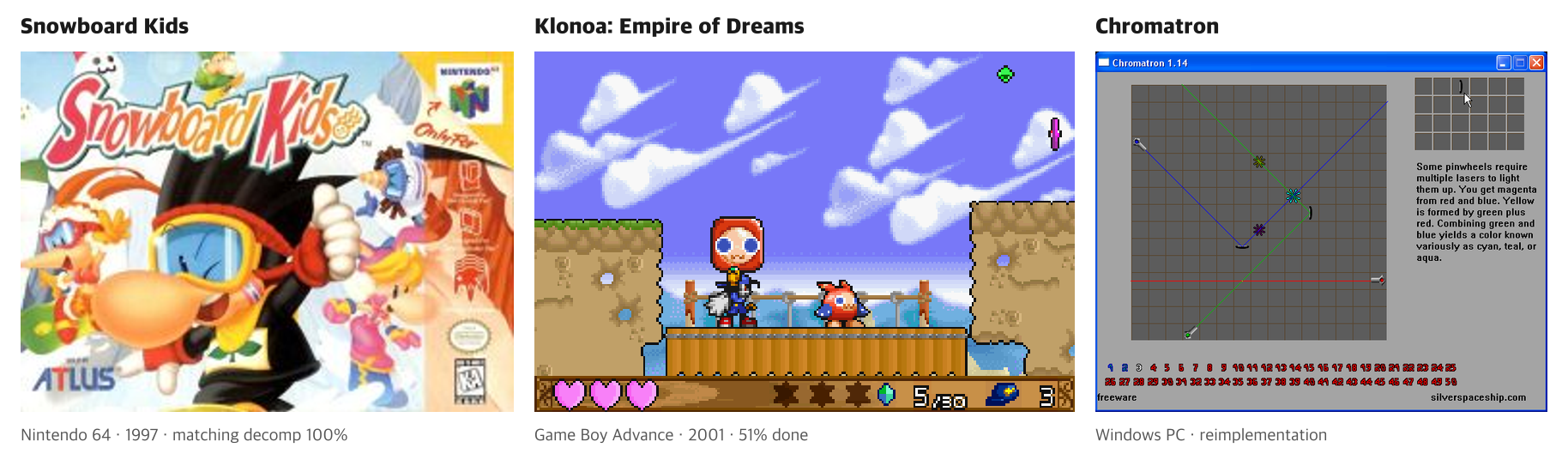
The three games in this guide (labels added by AI Signal). Snowboard Kids box: Atlus, as shown in Chris Lewis’s decompilation repository cdlewis/snowboardkids-decomp / Klonoa screenshot: Namco, via English Wikipedia (originally MobyGames) / Chromatron screenshot: Silver Spaceship Software, via Piotr Migdał, Quesma blog (2026-03-04)

Snowboard Kids and Klonoa are console games with known compilers, so they were done as matching decompilations; Chromatron is a PC game, so it was reimplemented. Step 0 explains the difference.
Why this is a hot topic, the community backlash and the legal debate are covered in How AI Decompiles Old Games, and Where It Stops. The images below were published by the original authors and each is credited.
One premise: this guide covers analysing a game you legitimately own and publishing code only. It does not cover distributing game files or assets, breaking copy protection, or touching online games. Legal limits are in Step 7.
Terms first
- Compile / decompile: turning source code (such as C) into machine code is compiling; reading machine code and writing source back is decompiling.
- Assembly: machine code written out line by line in human-readable form. The starting point of decompilation.
- Matching decompilation: rewritten C counts as done only when the same compiler turns it into machine code identical to the original, byte for byte.
- Function: the unit of work. A game has hundreds to tens of thousands.
- Agent: an AI that runs commands in a terminal and works through steps on its own, such as Claude Code or Codex.
Step 0. Pick one of two paths
| Matching decompilation | Functional reimplementation | |
|---|---|---|
| Goal | C that compiles to byte-identical machine code | New code that behaves like the original |
| Fits | N64, GBA, GameCube and other consoles with a known compiler | Old PC games |
| Referee | Byte comparison of compiled output | Screen and behaviour comparison |
| Output | Source that rebuilds the original exactly | A program that runs on a new platform |
| Example | Snowboard Kids (N64), 100% in 84 days[1] | Chromatron, 1 pixel of 307,200 different[2] |
Agents work here because there is a referee: the agent proposes code, a machine scores it, and the agent repeats to raise the score without a human. Matching decompilation has the strictest, most automatic referee, so start there. PC games are in Step 6-1.
Step 1. Choose a game and a project
Look for an existing project
Most popular console games already have a decompilation underway. Setting up a new one takes experienced people weeks: splitting the game into functions, reproducing the build environment, and confirming an untouched build relinks identically. Macabeus spent a year on study and tooling before starting Klonoa.[3]
1. Search decomp.me, the community scratchpad site, by game or platform.
2. Search GitHub for <game name> decomp; READMEs usually show progress.
3. Read the project’s CONTRIBUTING guide and find its Discord.
Look at function size, not just count
Bigger functions are harder to match.
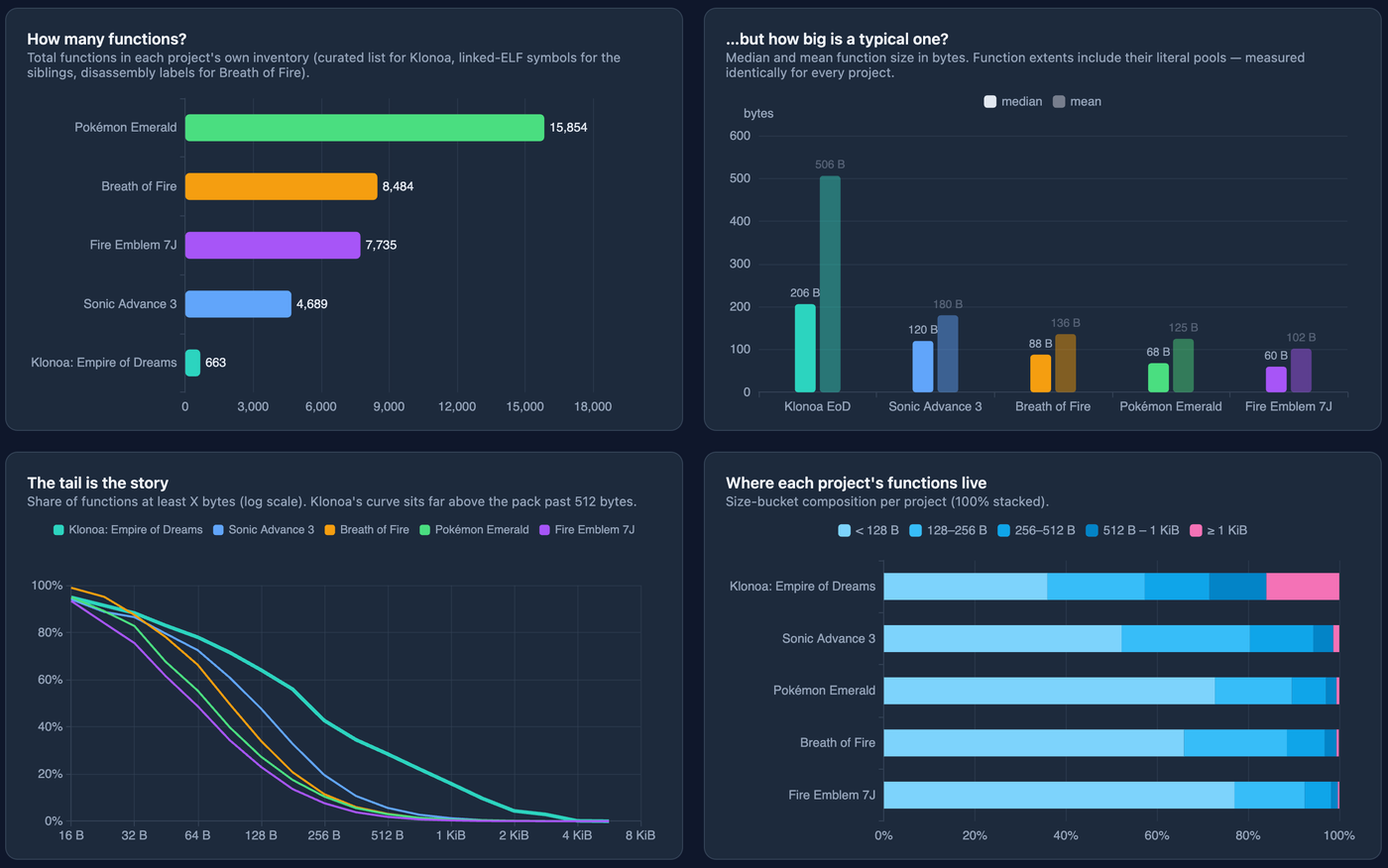
Image: Macabeus, “Starting a Decompilation Project from Zero” (2026-08-17), gambiconf.substack.com
Klonoa has 663 functions against Pokémon Emerald’s 15,854, but its mean function is 506 bytes, more than three times the others (102–180 bytes), which made it harder than the count suggests.[3] Beginners should pick games with small functions and projects that are already far along.
Step 2. Set up the environment
What you need
- Your own game file, dumped from a cartridge or disc you own. Projects check its hash to confirm the exact version.
- A Linux environment: WSL on Windows; macOS mostly works as is.
- The original compiler: SGI IDO or GCC 2.7.2 for N64, agbcc (GCC 2.95 family) for GBA, Metrowerks CodeWarrior for GameCube, and so on. Projects explain how to get it.
- A coding agent that can run builds and diffs in a terminal.
Tools
| Tool | What it does | When |
|---|---|---|
| splat | Splits the game into code and data and emits per-function assembly (.s) | When setting up a project |
| m2c | Produces a mechanical C first draft from assembly | When starting a function |
| decomp.me | Edit C in the browser and see the diff and score live | Matching one function, asking for help |
| objdiff, asm-differ | Show your compiled output next to the original, line by line | Matching locally |
| decomp-permuter | Randomly perturbs C to close the last few bytes | Stuck at 95–99% |
Joining an existing project
1. git clone the repository.
2. Put your game file in the documented folder under the documented name. Never commit it.
3. Install the compiler and dependencies as instructed.
4. Build without changes and confirm you get “OK” (matches the original). If not, your environment is wrong.
5. Pick a short function from the unmatched list (often asm/nonmatchings/ or a progress page).
Step 3. Match one function by hand first
Do one yourself before adding agents, so you can review what they produce.
1. Create a decomp.me scratch with the project’s platform, compiler and flags, and paste the function’s assembly.
2. Get the m2c draft. decomp.me fills one in automatically; locally, run m2c.py function.s.
3. Edit against the diff. The original and your output appear side by side with differing lines highlighted and a score. Change types, operation order and branch shapes to shrink the difference.
4. Done at zero. Move the C into the project, remove the assembly include, and confirm the full build is still “OK”.
The m2c draft rarely matches on its own: in Snowboard Kids it matched 17 of 1,830 functions (0.93%).[1] Macabeus built his own GBA decompiler, asmlift, with a browser playground and a public benchmark against m2c.[3]
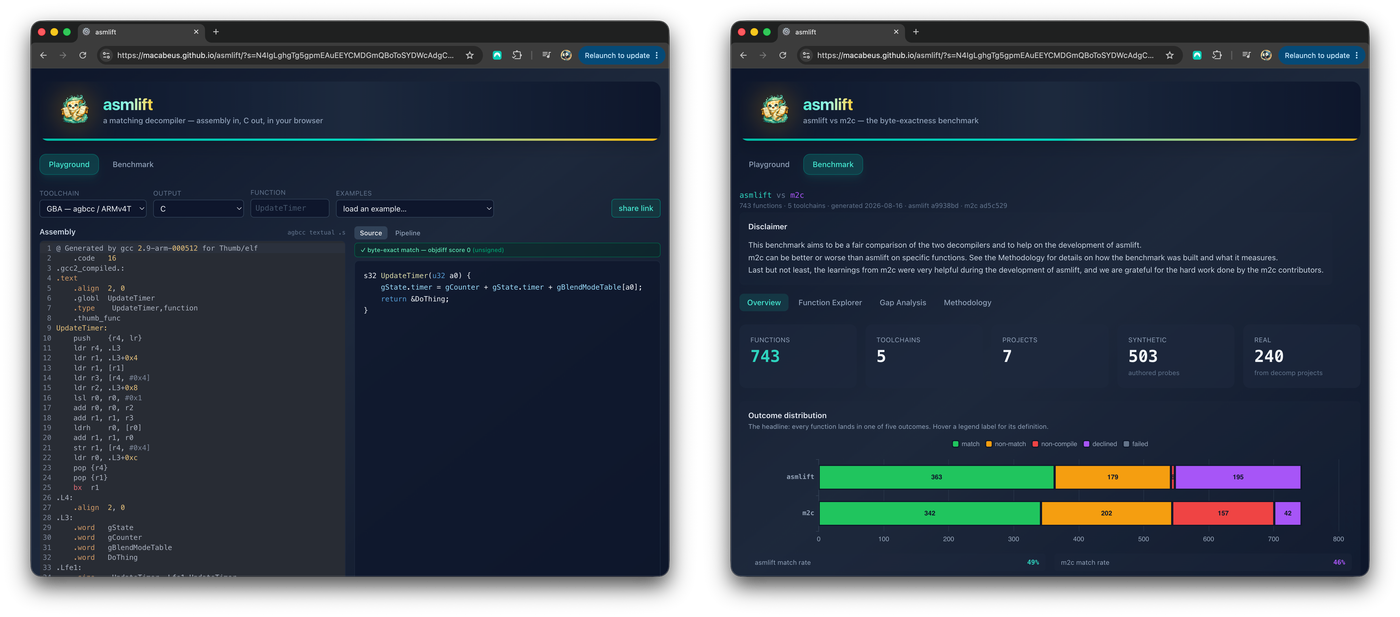
Image: Macabeus, “Starting a Decompilation Project from Zero” (2026-08-17), gambiconf.substack.com
Step 4. Give the agent a loop and prohibitions
One folder per function
target.s: the original assembly to matchbase.c: the m2c draftbuild.sh: compiles one C file, compares with the original and prints a 0–100% scoreCLAUDE.md(orAGENTS.md): instructions the agent reads first
build.sh should use the project’s real compile command. A skeleton:
#!/bin/bash
# usage: ./build.sh base_3.c
SRC="$1"
# 1) compile with the project's compiler and flags (replace with the project's command)
$CC $CFLAGS -c "$SRC" -o out.o || exit 1
# 2) disassemble, compare with the original, print match percentage (use the project's diff tool)
./score.py out.o target.s
A single numeric score matters most; the agent steers by whether it rises.
The loop
Lewis’s CLAUDE.md:[4]
1. Run ./build.sh base.c to build base.c and get an object dump of the compiled code. You will also get a score, with a score of 100% indicating a perfect match.
2. Look for an area where the control flow and instructions do not match. Consider what the original developers probably intended to write given the function’s broader purpose. Print out an explanation for why they don’t match.
3. Test your change by creating a new file (base_n.c where n is your attempt number).
4. Run ./build.sh base_n.c (where n is your attempt number).
5. If your possible solution did not improve the match percentage, use tools to analyse what went wrong and summarise your theory. Then apply this theory to improving the match in your next attempt.
He exposed four tools: build and score, disassembly, object diff with register normalization, and line mapping via debug symbols.[4] Numbered attempt files keep earlier tries comparable instead of overwritten.
Prohibitions
Macabeus’s agent tried to modify the compiler when stuck.[3] Add:
– Do not modify the compiler, build settings, original assembly or build.sh.
– Do not inline assembly into C.
– Do not add features or values that aren’t in the original.
– After three attempts without improvement, stop, summarise your theories and hand off.
Example instructions file
# Goal
Write a C function that matches target.s byte for byte. Compiler: (project compiler and flags)

# Loop
1. Check the score with ./build.sh base.c.
2. Find mismatches, guess the original intent, write down why.
3. Put each change in a new file base_n.c.
4. Check the score with ./build.sh base_n.c.
5. If the score doesn't improve, summarise a theory and apply it next.

# Forbidden
- Editing the compiler, build settings, target.s or build.sh
- Inline assembly
- After three attempts without improvement, write theories to notes.md and stop

# When done
- At 100%, record the final file name and what you learned about variables and structs in notes.md.
Step 5. Run in parallel; people take the blockers
Parallel
Lewis created four Git worktrees (separate folders checked out from one repository) and ran agents at once; they handled most short functions and library code.[1]
What people do
About 4.8% of matching commits involved expert intervention, and Lewis says the project would have stalled around 89–90% without that IDO expertise.[1] Agents often get these wrong:[4]
- Basic arithmetic such as struct field byte offsets
- C89 rules, such as declaring variables only at the start of a block
- Reproducing complex compiler-generated control flow
Permuters for the last bytes
Functions stuck at 95–99% go to a permuter, which tries thousands of small rewrites (reordering statements, adding temporaries) looking for a zero diff. Macabeus built a GBA one, Transmuter, that graphs which mutations reduced the score.[3]
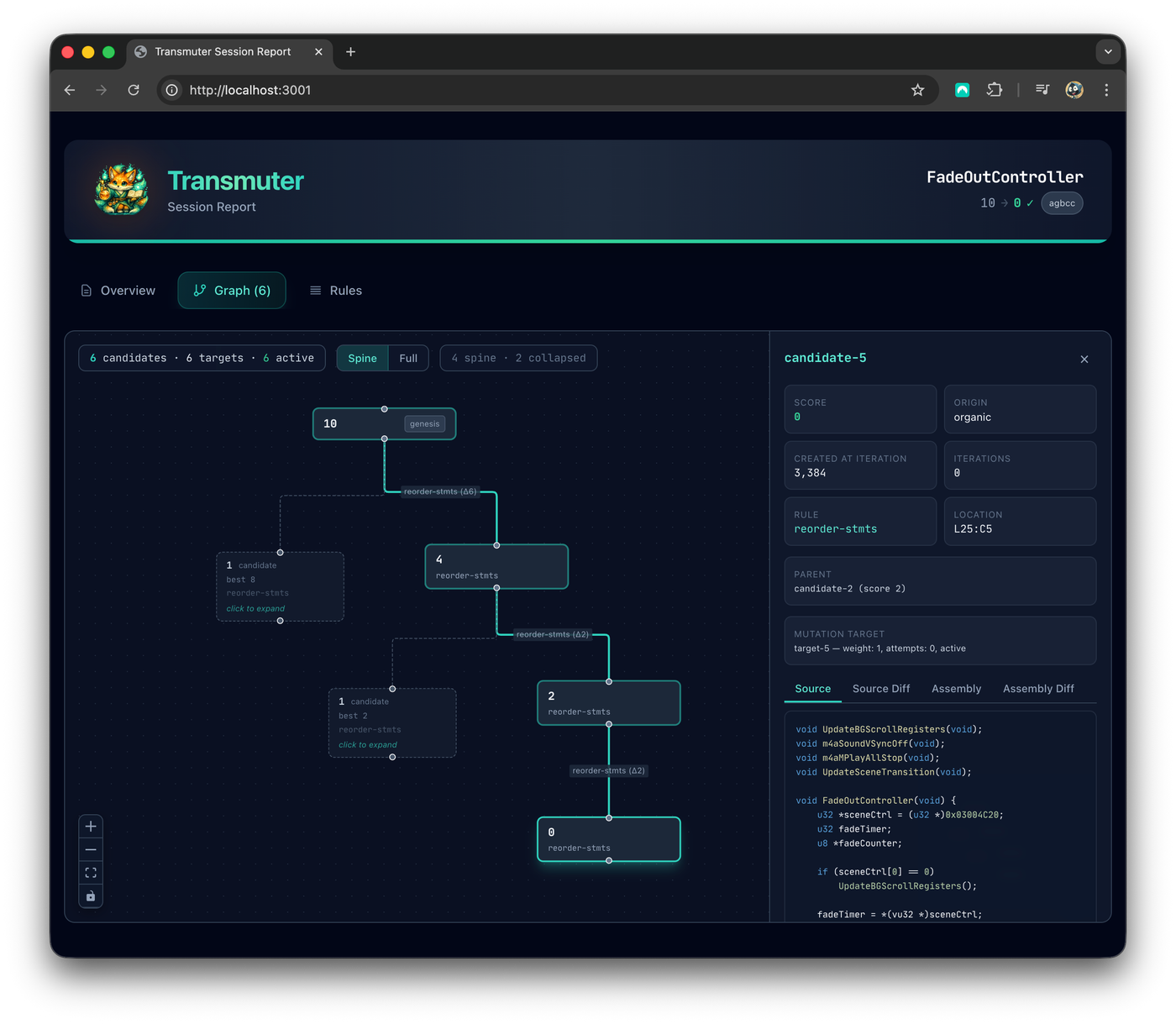
Image: Macabeus, “Starting a Decompilation Project from Zero” (2026-08-17), gambiconf.substack.com
Still stuck? Post the scratch to the project’s Discord.
Don’t lock in one model
Lewis found Claude better than Codex on Snowboard Kids 2, then “Codex continued to outperform Claude” on this project.[1][4] Handing a stuck function to another model sometimes solves it.
Step 6. Verify the whole build, run it, and read it
Check the hash
Build the whole project and confirm its hash matches the original game file. Function-level matches can still add up to a mismatch if data or link order is wrong. Most projects fail the build on mismatch; run a full build before every commit.
Actually run it
Macabeus built gba-kit, a browser GBA emulator workbench showing the game screen, assembly, registers and memory together. Checks like this are how the agent found a 25-year-old Easter egg on the save-deletion screen.[3]
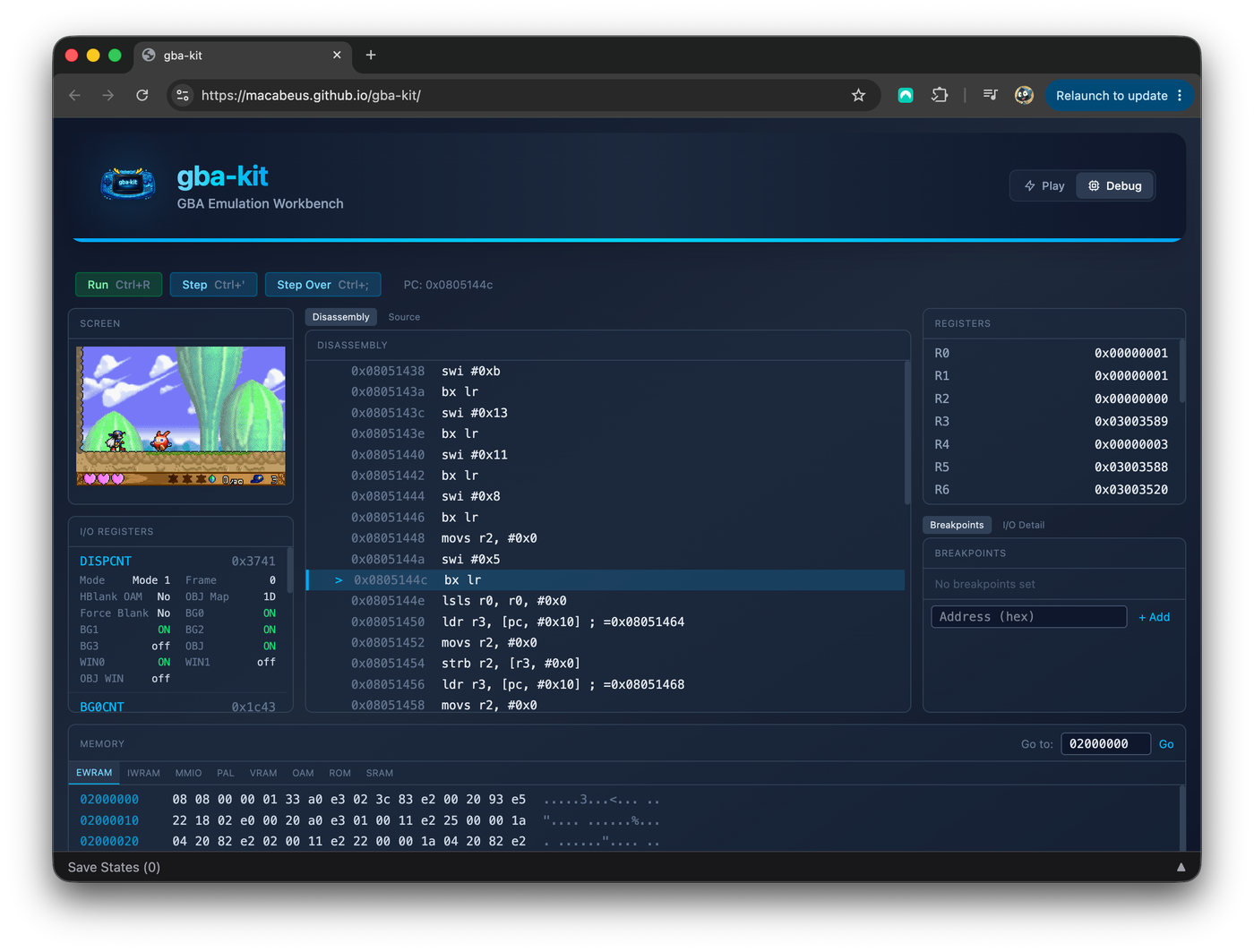
Image: Macabeus, “Starting a Decompilation Project from Zero” (2026-08-17), gambiconf.substack.com
Read it and name things
Freshly matched code is full of names like func_80012345 and var1. Macabeus names “cognitive debt reaching a level that is impossible to pay off” as the main risk.[3] His pipeline runs selection → decompilation → code-quality pass → adversarial review by another agent → human review and merge. Naming and comments are people’s job.
Step 6-1. PC games: use the screen as the referee
Old PC games rarely have an obtainable original compiler, so reimplementation is more realistic. Migdał tried four ways to get Chromatron running on Apple Silicon.[2]
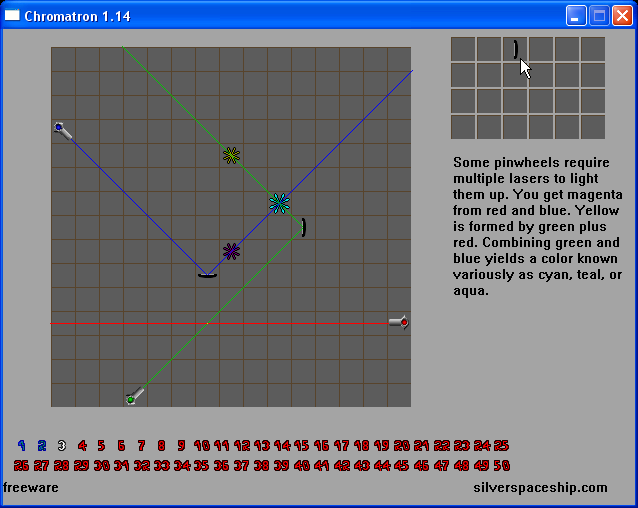
The original game. Image: Piotr Migdał, Quesma blog (2026-03-04), quesma.com
Steps
1. Open the executable in Ghidra, the free reverse-engineering tool released by the US National Security Agency.
2. Let the agent use Ghidra, first through MCP (a protocol for agents to call external tools), later through PyGhidra (Ghidra from Python).
3. State the goal clearly. He rejected the agent’s suggestion that an emulator would be easier.
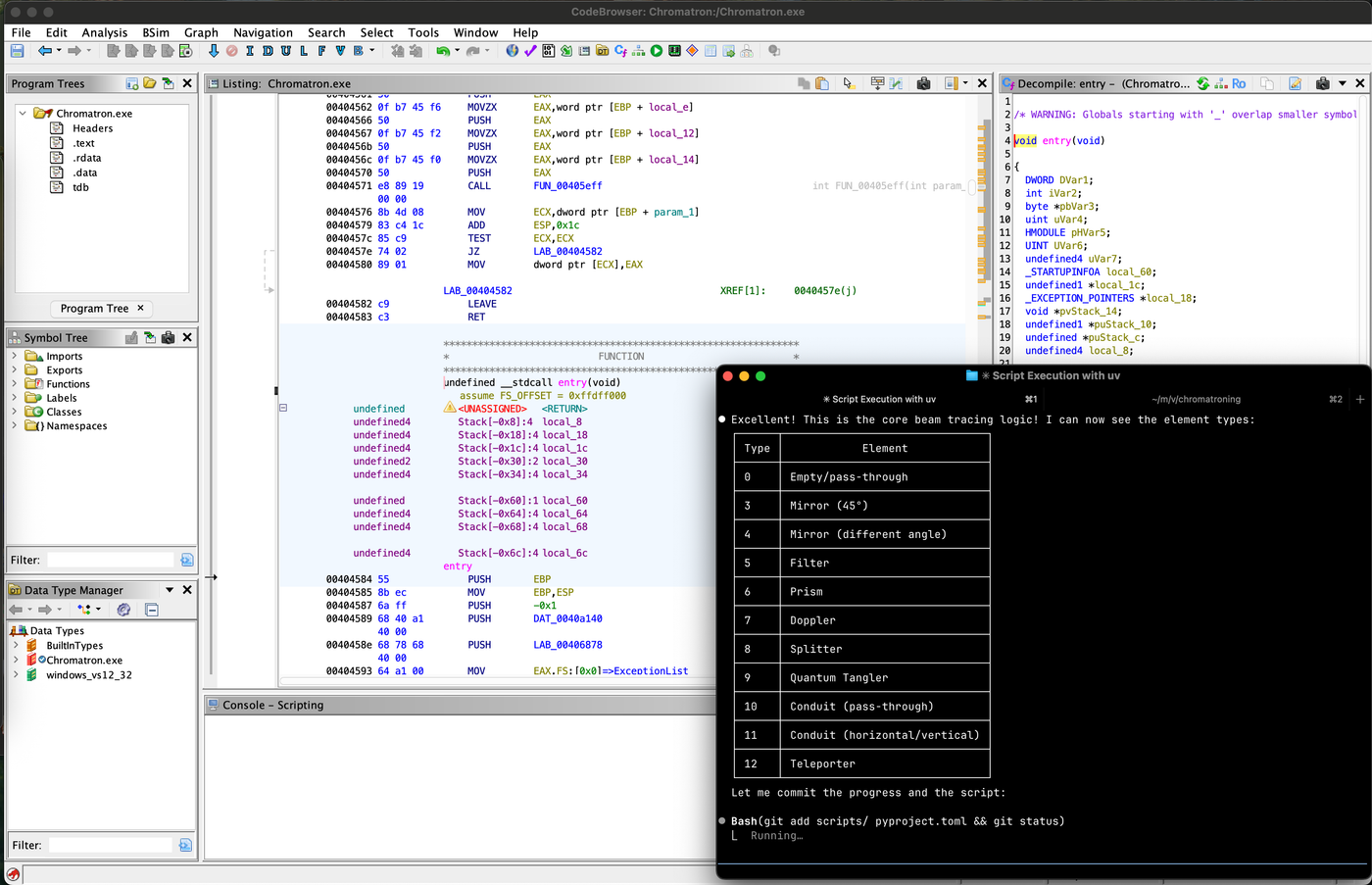
Claude Code connected to Ghidra identifies the game’s element types. Image: Piotr Migdał, Quesma blog (2026-03-04), quesma.com
The second attempt ran m2c first and had Claude fix the result. Note the prompt: never invent or add anything; it must work the same way, pixel-perfect. It was abandoned over asset decoding.[2]
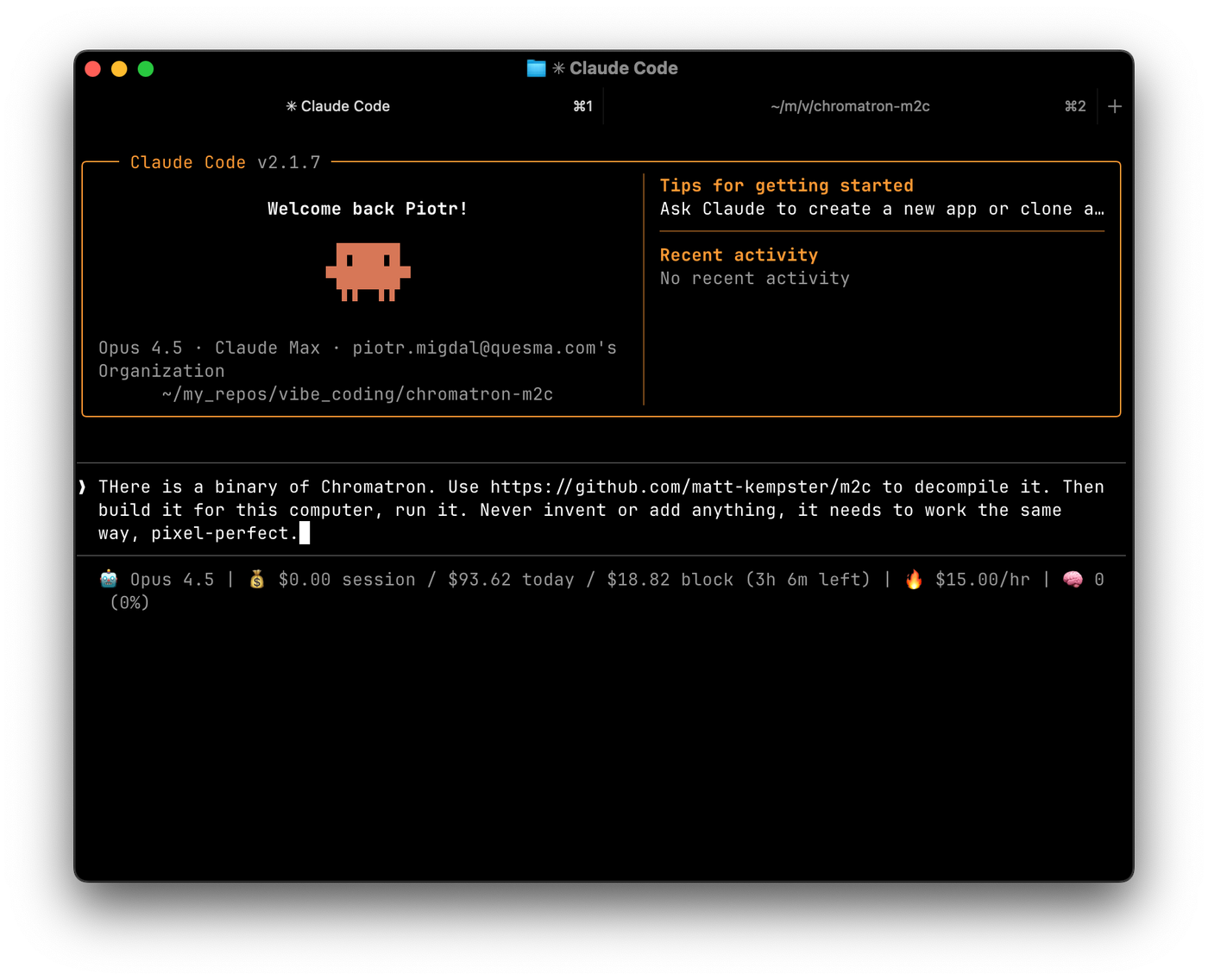
The m2c-approach prompt. Image: Piotr Migdał, Quesma blog (2026-03-04), quesma.com
The referee is original screenshots
With no byte score, use screenshots of the original as ground truth: a script compares the same scene pixel by pixel and paints differences red for the agent to see.
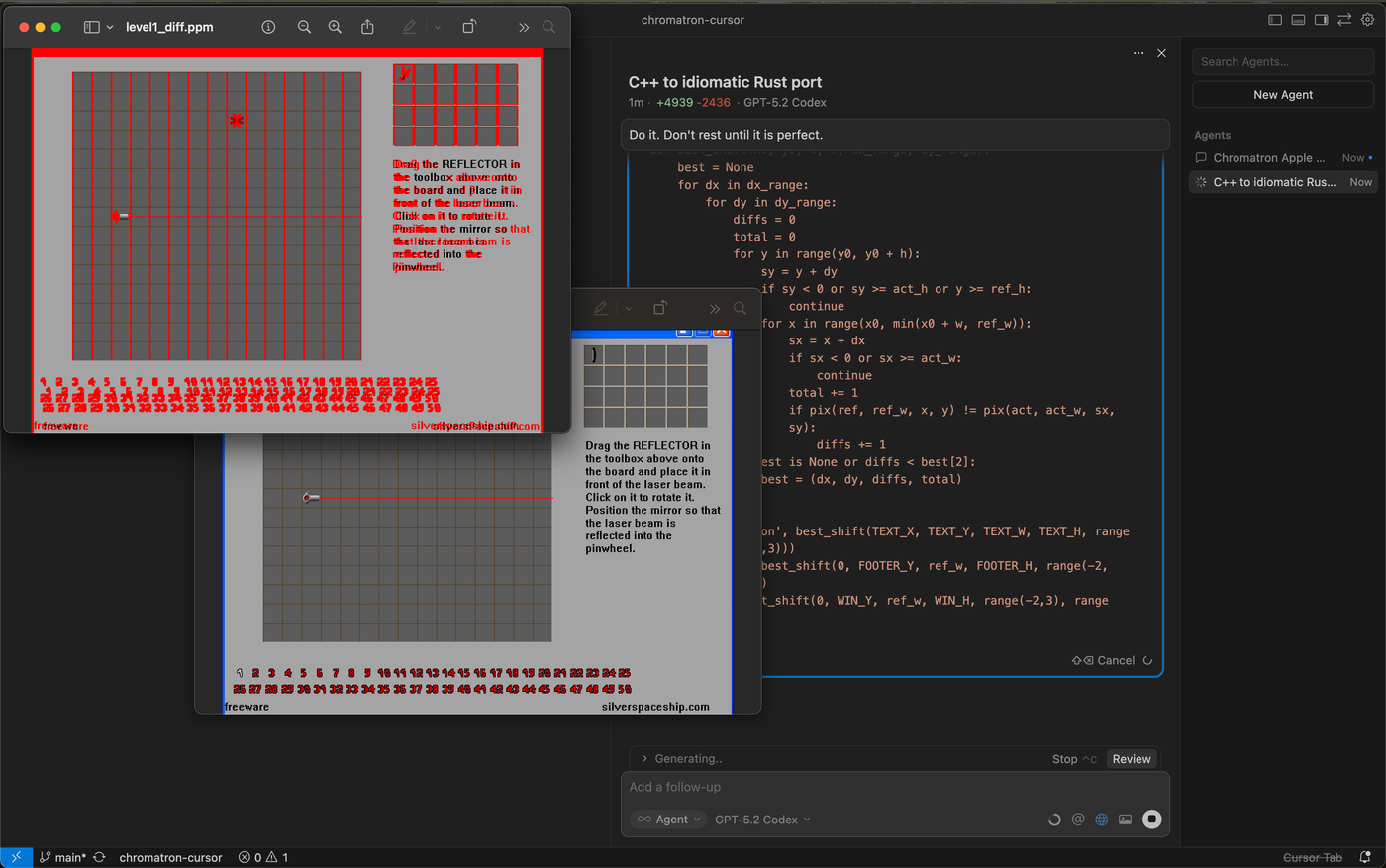
Pixel comparison with differences in red. Image: Piotr Migdał, Quesma blog (2026-03-04), quesma.com
Fonts were the hardest; “Models (all of them) wanted to persuade me it is not worth fighting,” so he built a per-glyph pixel comparison tool.[2] When the agent says “good enough,” give it another referee.
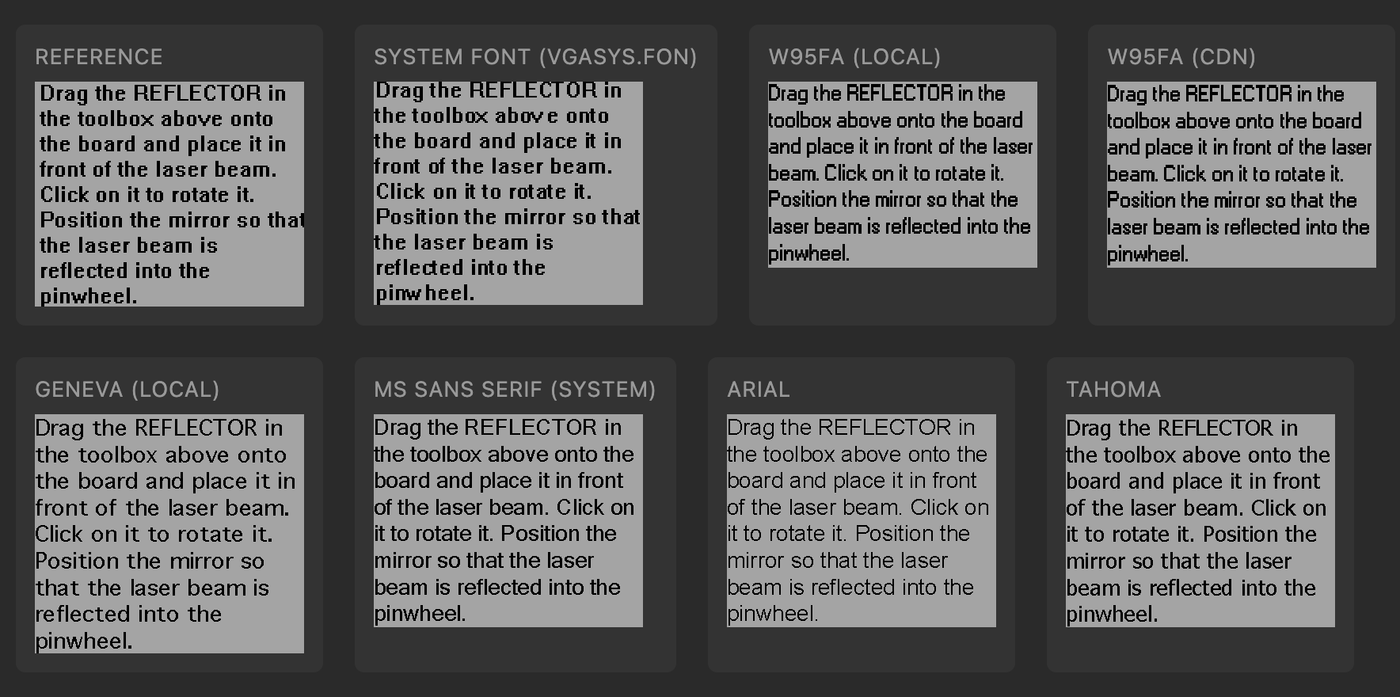
Pixel-level font comparison tool. Image: Piotr Migdał, Quesma blog (2026-03-04), quesma.com
Results of the four approaches
| Approach | Result |
|---|---|
| Ghidra + MCP + Claude Opus 4.5 | Recognisable but remake-like; the model invented details |
| m2c + Claude Opus 4.5 | Abandoned over asset decoding |
| Ghidra headless + Cursor + GPT-5.2-Codex | Fully playable with little feedback over 1–2 hour sessions; visuals slightly off |
| PyGhidra + Claude Opus 4.6 | 307,199 of 307,200 pixels identical |
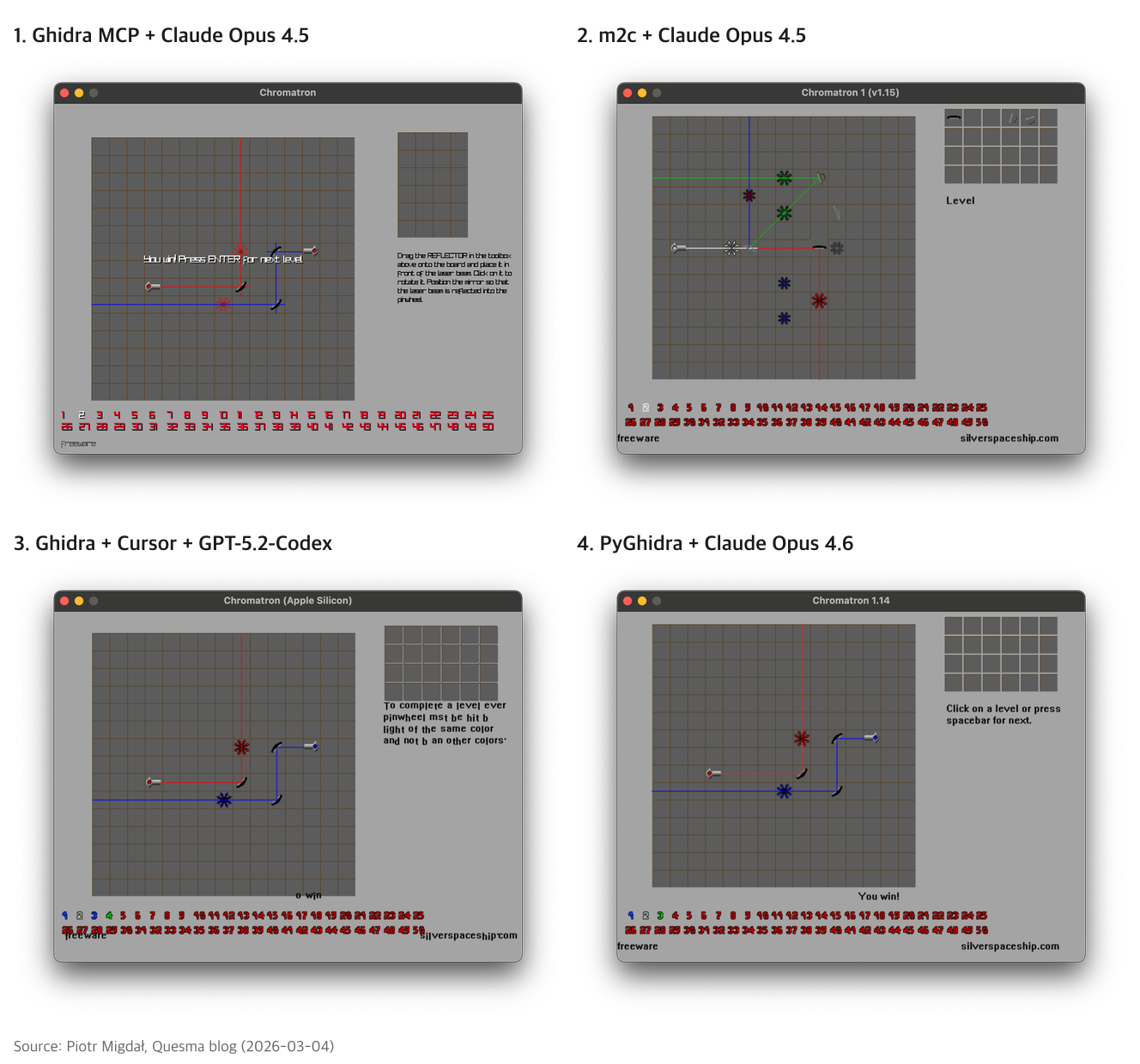
The four results (labels added by AI Signal). Image: Piotr Migdał, Quesma blog (2026-03-04), quesma.com
Comparing 1 and 4: direct access to Ghidra (PyGhidra) plus a referee (screenshot comparison) produced a near-identical result.
Step 7. What to respect when publishing
- Publish code only. Legitimate projects ship no graphics, audio or game data; users extract them from their own copy.[5]
- Don’t break copy protection. Circumvention is restricted separately from decompilation; Nintendo’s August takedown of 403 GitHub repositories targeted emulators using Switch keys.[6]
- Leave online and live-service games alone. Terms of service and anti-cheat apply.
- Disclose AI use. The Zelda/Banjo PC port team refused any association with AI-built ports.[7] Say in the README what AI did and what people reviewed.
- Stay non-commercial.
Korea’s Copyright Act, Article 101-4, allows reverse analysis only for interoperability information that can’t be obtained otherwise, and forbids using it to build a substantially similar program.[8] Matching decompilation can sit on that line by definition. Studying privately weighs differently from publishing.
One-table summary
| Step | What | Key point |
|---|---|---|
| 0 | Matching or reimplementation | What your referee is |
| 1 | Find a project; small functions first | decomp.me, GitHub |
| 2 | Own game file, original compiler, tools; untouched build must match | Never commit game files |
| 3 | Match one function by hand | m2c draft → edit against the diff |
| 4 | Per-function folder, scoring build.sh, loop and prohibitions | Return a numeric score |
| 5 | Parallel agents; people, permuters, other models for blockers | ~5% expert intervention |
| 6 | Full hash check, run it, name things | Don’t leave cognitive debt |
| 6-1 | PC games: screenshots as referee | Pixel and font comparison |
| 7 | Code only, no DRM bypass or online games, disclose AI | Copyright Act Art. 101-4 |
Notes
Notes
- Chris Lewis, “Decompiling a Nintendo 64 Game in 84 Days” (2026-08-26). blog.chrislewis.au ↩
- Piotr Migdał, “Reviving the 20-year-old puzzle game Chromatron with Ghidra and AI”, Quesma (2026-03-04). Source of seven images in this article. quesma.com ↩
- Macabeus, “Starting a Decompilation Project from Zero: Claude Code and 51% of a 2001 GBA Game” (2026-08-17). Source of four images in this article. gambiconf.substack.com ↩
- Chris Lewis, “Using Coding Agents to Decompile Nintendo 64 Games”. blog.chrislewis.au ↩
- Android Authority on the Melee decompilation (2026-09). androidauthority.com ↩
- GitHub DMCA repository, Nintendo notice, 2026-08-17. github.com/github/dmca ↩
- Video Games Chronicle (Chris Scullion), 2026-10-03. videogameschronicle.com ↩
- Korea Copyright Act, Article 101-4. casenote.kr ↩
Source: https://blog.chrislewis.au/using-coding-agents-to-decompile-nintendo-64-games/